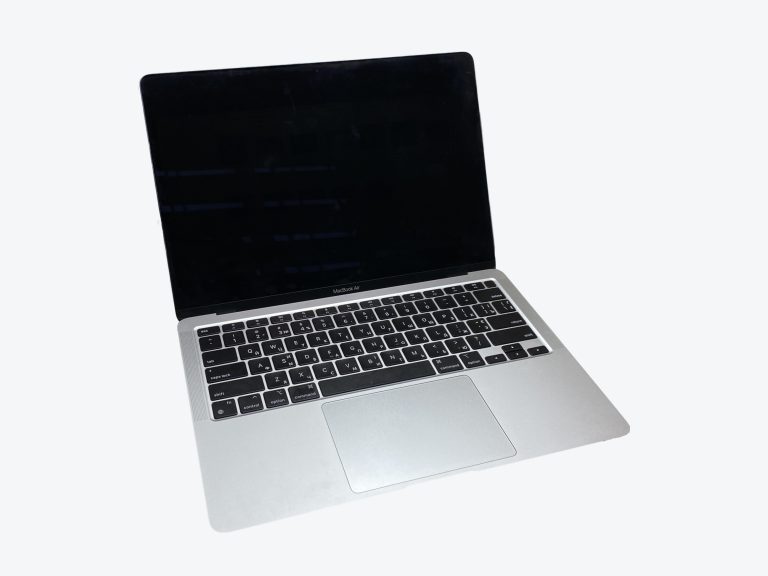
MacBook Air M1 vs MacBook Air M2
A single brand, two separate lines: Apple covers this space with both the MacBook Air M1 and the MacBook Air M2. The scorecard favors the MacBook Air M2, which leads in 4 of 5 areas. Its strongest showing is in the display category. The launch prices sit $200 apart, with the MacBook Air M1 on the more affordable side.
At a glance
- Display MacBook Air M2 wins
- Performance MacBook Air M2 wins
- Memory & Storage MacBook Air M2 wins
- Battery Life & Charging MacBook Air M2 wins
- Ports & Connectivity Tie
- Price MacBook Air M1 wins
- Display2.0
- Performance0.0
- Memory & Storage0.0
- Battery Life & Charging0.0
- Display5.8
- Performance4.0
- Memory & Storage1.3
- Battery Life & Charging2.6
Spec scores (0 to 10) are calculated from manufacturer specs against other models in the same class. See how the formula works. They are not reviews or user ratings.
Key Differences
-
The MacBook Air M2 has 25% higher brightness
For peak brightness (sdr), the MacBook Air M2 leads by a wide margin: 500 nits versus 400 nits. Indoors, both may be bright enough; the difference shows up in daylight.
-
The MacBook Air M2 has a 0.11 lb lighter build
Small gaps can still matter over time, and here the MacBook Air M2 leads 2.73 lb to 2.84 lb. Remember the charger too: a lighter laptop with a heavy power brick can erase part of the gap.
-
The MacBook Air M2 has a 0.19 in slimmer chassis
This is a headline difference. With 0.44 in to the MacBook Air M1’s 0.63 in, the MacBook Air M2 has a lead that’s easy to see on paper and in practice. For daily commuting, the MacBook Air M2’s thinner profile is a small but constant comfort.
-
The MacBook Air M2 has up to 24 GB of memory
Put simply, the MacBook Air M2 is far ahead here: 24 GB compared with 16 GB. Most people never configure the maximum, so this matters mainly to power users.
-
The MacBook Air M2 has 1 more GPU cores
The difference is minor (8 against 7), but if you’re splitting hairs, the MacBook Air M2 wins it. More GPU cores mean more graphics power for games, video editing and 3D work.
Design & Size
- MacBook Air M1 11.97 in × 8.36 in × 0.63 in
- MacBook Air M2 11.97 in × 8.46 in × 0.44 in
If you’re worried about fit, relax: either laptop occupies roughly the same footprint. The MacBook Air M1 carries an extra 0.11 lb. The MacBook Air M2 keeps a lower profile: 0.19 in thinner than the MacBook Air M1.
Design & Build
| Spec | MacBook Air M1 | MacBook Air M2 |
|---|---|---|
| Width | 11.97 in | 11.97 in |
| Depth | 8.36 in | 8.46 in |
| Thickness | 0.63 in | 0.44 in (winner) |
| Weight | 2.84 lb | 2.73 lb (winner) |
Display
MacBook Air M2 leads
Few areas are as clear-cut as this one: the MacBook Air M2 leads the display section with room to spare. On its side, the MacBook Air M2 has 25% higher brightness. A brighter screen stays readable next to windows, under harsh office lights and outdoors in the shade. If display is your priority, the MacBook Air M2 is the laptop to pick.
Peak brightness (SDR)
MacBook Air M1: 400 nits MacBook Air M2: 500 nits If you often work in bright places, the MacBook Air M2’s display is the easier one to read.
Performance
MacBook Air M2 leads
The performance numbers lean toward the MacBook Air M2, not dramatically but consistently. The MacBook Air M2 delivers 1 more GPU cores. Creative apps that use GPU acceleration will benefit from the MacBook Air M2’s extra cores. For performance, the MacBook Air M2 is the one to beat.
GPU cores
MacBook Air M1: 7 MacBook Air M2: 8 If you only use office apps and a browser, the GPU gap is unlikely to affect you.
Memory & Storage
MacBook Air M2 leads
The MacBook Air M2 edges the memory & storage section, though the MacBook Air M1 stays close. The MacBook Air M2 scores with up to 24 GB of memory. For large datasets, virtual machines or heavy creative projects, the MacBook Air M2’s higher maximum is valuable. In short, the MacBook Air M2 is the better-equipped laptop for memory & storage.
Max memory
MacBook Air M1: 16 GB MacBook Air M2: 24 GB A higher memory ceiling means you can configure the laptop for heavier workloads when you buy it.
Battery Life & Charging
MacBook Air M2 leads
A modest lead on battery life & charging belongs to the MacBook Air M2. The MacBook Air M2 answers with 5.4% more battery capacity. A bigger battery usually means more hours away from an outlet, although chip efficiency plays a huge role. The takeaway: on battery life & charging, the MacBook Air M2 is the stronger laptop.
Battery
MacBook Air M1: 49.9 Wh MacBook Air M2: 52.6 Wh Capacity is one of the few battery specs that doesn’t depend on test conditions, which makes it a useful comparison.
Ports & Connectivity
Too close to call
Neither pulls ahead on ports & connectivity; the numbers are close throughout. Don’t let ports & connectivity decide this one; look at the other sections instead.
Full Specifications
Display
| Spec | MacBook Air M1 | MacBook Air M2 |
|---|---|---|
| Screen size | 13.3 in | 13.6 in |
| Panel type | Retina IPS LCD | Liquid Retina IPS LCD |
| Resolution | 2560 x 1600 | 2560 x 1664 |
| Pixel density | 227 ppi Sharpest screen in class | 224 ppi |
| Refresh rate | 60 Hz | 60 Hz |
| Peak brightness (SDR) | 400 nits Dimmest screen in class | 500 nits (winner) |
Performance
| Spec | MacBook Air M1 | MacBook Air M2 |
|---|---|---|
| Processor | Apple M1 | Apple M2 |
| CPU cores | 8 | 8 |
| Graphics | Apple M1 GPU (7-core) | Apple M2 GPU (8-core) |
| GPU cores | 7 Fewest GPU cores | 8 (winner) |
| Cooling | Fanless (passive) | Fanless (passive) |
Memory & Storage
| Spec | MacBook Air M1 | MacBook Air M2 |
|---|---|---|
| Base memory | 8 GB | 8 GB |
| Max memory | 16 GB Lowest memory ceiling | 24 GB (winner) |
| Base storage | 256 GB | 256 GB |
| Max storage | 2 TB | 2 TB |
Battery Life & Charging
| Spec | MacBook Air M1 | MacBook Air M2 |
|---|---|---|
| Battery | 49.9 Wh Smallest battery in class | 52.6 Wh (winner) |
| Rated battery lifeManufacturer rating | 18 h | 18 h |
| Included charger | 30 W | 30 W |
Ports & Connectivity
| Spec | MacBook Air M1 | MacBook Air M2 |
|---|---|---|
| USB-C / Thunderbolt ports | 2 | 2 |
| Other ports | 3.5 mm headphone jack | MagSafe 3, 3.5 mm headphone jack |
| Webcam | 720p FaceTime HD | 1080p FaceTime HD |
| Wi-Fi | Wi-Fi 6 (802.11ax) | Wi-Fi 6 (802.11ax) |
| Operating system | macOS Big Sur | macOS Monterey |
Design & Build
| Spec | MacBook Air M1 | MacBook Air M2 |
|---|---|---|
| Width | 11.97 in | 11.97 in |
| Depth | 8.36 in | 8.46 in |
| Thickness | 0.63 in | 0.44 in (winner) |
| Weight | 2.84 lb | 2.73 lb (winner) |
Price
| Spec | MacBook Air M1 | MacBook Air M2 |
|---|---|---|
| Launch price | $999 (winner) | $1,199 Priciest in class |
“N/A” means the manufacturer does not specify the value or we could not confirm it. Figures marked “manufacturer rating” are the maker’s own claims, not our measurements.
Price & Value
The MacBook Air M1 launched at $200 less than the MacBook Air M2, a gap of 20%. The MacBook Air M2 costs $200 more, and for that you get 25% higher brightness and a 0.11 lb lighter build.
Prices shown are US launch prices as of June 2022. Retail prices change often, so it’s worth checking current offers.
Which One Should You Buy?
Choose the MacBook Air M1 if…
- you want more value for your money ($200 less at launch)
- you don’t need what the newer model adds
Choose the MacBook Air M2 if…
- you often work near windows or outdoors (500 nits vs 400 nits)
- you carry your laptop around all day (2.73 lb vs 2.84 lb)
- you want the slimmer laptop (0.44 in vs 0.63 in)
- you might configure it with lots of memory (24 GB vs 16 GB maximum)
- you plan to keep it for a long time and want to start from the newer generation
Also Compared
Frequently Asked Questions
Should I buy the MacBook Air M1 or the MacBook Air M2?
We’d point most buyers to the MacBook Air M2. The main exception is if you have better plans for $200.
Should I upgrade from the MacBook Air M1 to the MacBook Air M2?
For most owners, it’s a meaningful step. The MacBook Air M2 brings 25% higher brightness, a 0.11 lb lighter build and a 0.19 in slimmer chassis over the MacBook Air M1.
Does the MacBook Air M1 last longer on a charge than the MacBook Air M2?
It’s effectively a tie. The battery figures for the MacBook Air M1 and the MacBook Air M2 are too close to call.
Is the MacBook Air M1 bigger than the MacBook Air M2?
Size is essentially a tie. The official dimensions of the MacBook Air M1 and the MacBook Air M2 differ only marginally.
Which is faster, the MacBook Air M1 or the MacBook Air M2?
On paper, the MacBook Air M2 is the stronger performer, with 1 more GPU cores.
Which has the better screen, the MacBook Air M1 or the MacBook Air M2?
The MacBook Air M2 has the stronger display on paper, with 25% higher brightness.
Executive Summary
When I compare the MacBook Air M1 and the MacBook Air M2, I try to ignore the names and look only at what changes. I think the MacBook Air M2 makes its strongest case with 25% higher brightness. It also helps that the MacBook Air M2 has a 0.11 lb lighter build.
I’d match them like this: price to the MacBook Air M1, display to the MacBook Air M2.
My pick: the MacBook Air M2; the one scenario where I’d reach for the MacBook Air M1 is if saving $200 matters more to you than the extras.
Personal opinion based on the data above. Your priorities may differ.